How Do I Set A Pending Order on MetaTrader Charts?

Hello MTL,

Please can someone explain how I can quickly set a Pending Order directly from the MT5 chart?

O
@obinna - 1 year ago

Some people take a longer method of doing it by clicking the New Order icon but for me I set the pending order directly from the charts because its faster and saves time.

I will give an example of how to place a Pending Sell Order on an MT5 BTC/USD chart.

Step 1

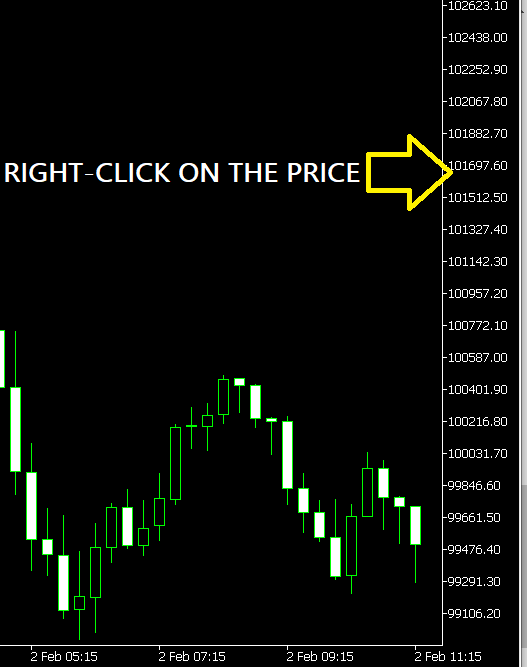
I right-click on the price I want to target.

Note that to open a Pending Sell Order you right-click above the current price and to set a pending Buy Order, you right-click below the current price.

The idea is to buy when the price is low & sell when the price is high.

O
@obinna - 1 year ago
Quoted - obinna

Step 2

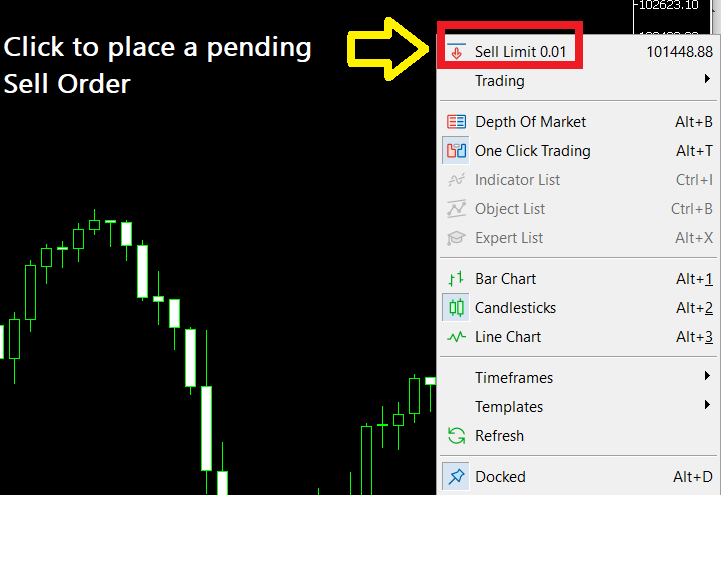
After you right-click on the price axis, click on "Sell-Limit "

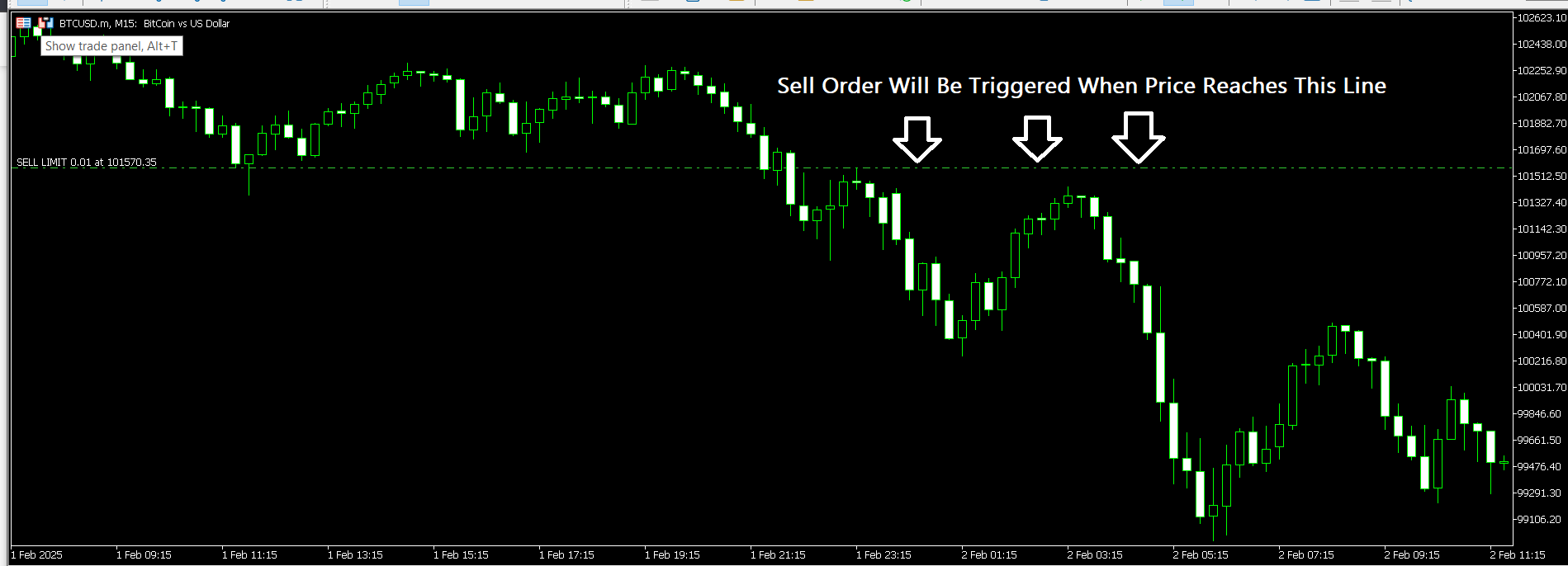
After clicking on sell limit, you will see a green line appear across the chart marking the point where the pending sell order will be triggered when price gets to it.

O
@obinna - 1 year ago
Quoted - obinna

After clicking on sell limit, you will see a green line appear across the chart marking the point where the pending sell order will be triggered when price gets to it.

So the same procedure applies if you want to place a pending Buy Order, this time you will need to right-click below the current candle (meaning right-click below the current price) to set up the order.

N
@njunga_22 - 1 year ago
Quoted - obinna

So the same procedure applies if you want to place a pending Buy Order, this time you will need to right-click below the current candle (meaning right-click below the current price) to set up the order.

Your method is really simple @Obinna.

When I started trading forex, part of the reason for my losses was because I didn't know how to apply pending orders to my advantage.

I am sure this (not using POs) is part of the reason many new forex traders are not profitable. MT5 has so many hidden tools that we have to master.

M
@mercury01 - 4 months ago

To set a pending order simply right-click on the chart and select buy or sell stop/limit. The pending order line will then appear on your chart visually and once price gets to the line, the pending order will be executed transforming it into a live trade. One of the best trading platforms for order management is not MetaTrader but cTrader.

Disclaimer:

At MyTradingLand.com, we connect you with forex brokers and provide a community for traders. While we offer valuable information and resources, please note that we are not financial advisors and cannot provide personalized financial advice. Always conduct your own research and invest responsibly.

Community Guidelines: The MyTradingLand.com community is designed as a resource for forex traders, promoting respectful and constructive discussions. We reserve the right to remove any content that is misleading, abusive, or violates our terms of service.

Broker Information: While we may receive commissions or advertising income from some of the brokers listed, this does not imply an endorsement of any broker, nor does it affect our review process. Our evaluations are based solely on objective criteria and user feedback.

Always verify the regulatory status of any broker with your local financial authority, along with their terms and privacy policies, before engaging with them. It is crucial to conduct thorough research to ensure that you are making informed decisions.

Risk Warning: At MyTradingLand.com, we strive to provide accurate information; however, the forex market is highly volatile and can change rapidly. It is essential to verify any information before making investment decisions.

Please be aware that trading in forex involves substantial risk, and it is possible to lose more than your trading equity/investment capital. 70-90% of retail CFD traders incur losses in their trading activities as per information from various brokers.

You are solely responsible for your use of MyTradingLand.com and any trading decisions you make. We encourage all users to educate themselves thoroughly about forex trading and to consider seeking advice from qualified financial professionals.

Advertising Disclosure: We may earn commissions from recommended brokers, but our reviews are independent (not influenced by potential earnings). Sponsored content is clearly marked and doesn't reflect our views.

©2026 ©2025 All rights reserved Mytradingland.com